 |
tuchulcha
0.10.1
Graphical Workflow Configuration Editor
|
|
tuchulcha
0.10.1
Graphical Workflow Configuration Editor
|
To represent a node, you need its name and its type.
So the following example shows a valid parameter file:
| parameter | value | remarks |
|---|---|---|
| obj1.type | filereader | name: obj1; type: filereader |
This results in the following graph structure:
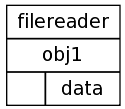
Example file: minimal.wrp
As shown above, only one parameter per object is strictly required. This is the object type which has to be a valid type specified in the used class information file (see Module Metadata).
If there is more than one object, you can establish connections between them. Therefore you have to specify the target slot in the target list of the source slot and vice versa. As you can see, the slot connections are realized like double linked lists. Empty source/target lists can be omitted.
A simple configuration with two objects is shown in the following table.
| parameter | value | remarks |
|---|---|---|
| obj1.type | filereader | first object |
| obj2.type | filewriter | second object |
| obj1.data | obj2.data | connection obj1.data->obj2.data |
| obj2.data | obj1.data | connetion obj2.data->obj1.data |
This results in the graph structure shown in the image below.
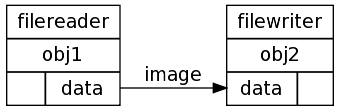
Example file: connected.wrp
Output slots can have as many targets as wanted. This can be used to implement some kind of observer design pattern.
Input slots can have at maximum one target from which they get their data from. This is useful to be able to query data from this slot when needed.
A valid example with multiple connections is shown in the table below.
| parameter | value | remarks |
|---|---|---|
| fr.type | filereader | data source |
| fw1.type | filewriter | first target |
| fw2.type | filewriter | second target |
| fr.data | fw1.data;fw2.data | multiple targets of output slot |
| fw1.data | fr.data | each input slot has ... |
| fw2.data | fr.data | ... only one target! |
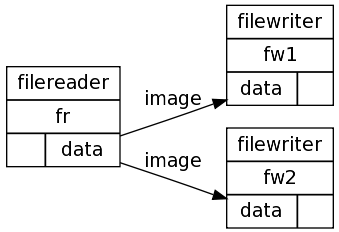
Example file: multicon.wrp
Parameters (as shown in the object inspector) can be set or left unset. Unset parameters will be shown in gray and default to their value given in the class description.
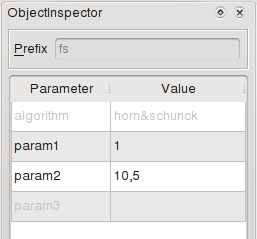
This is useful not to overload the parameter files and to be able to calculate default values (which do not have the same as in the class description) for unset parameters "on the fly" during object instatiation.
 1.8.6
1.8.6